
How to buy USDT on OKX / Binance
Once USDT arrives, the order page switches to paid automatically within 1 minute — no screenshot, no waiting for a person. If you have no USDT yet, buy it in the OKX or Binance app and withdraw it to the payment address on the order page. Pick either one; the steps are similar. The first time takes about 10–20 minutes (mostly waiting for the C2C seller to release the coins).
3 quick steps
- Buy USDT: buy USDT with C2C on OKX or Binance. Buy the "≈ X USDT" shown on the product page, plus 1–2 USDT extra for the withdrawal fee.
- Order: once the USDT arrives, come back and place the order, open the order page, choose the network, and copy the amount and payment address.
- Withdraw: in the app, withdraw to that address on the same network as the order page, so that the "amount received" equals the order amount exactly. The order page's "Follow these steps" has ready-made steps for Binance, OKX and wallets.
Which network: on Binance choose BEP20 (BNB Smart Chain, also called BSC) — lowest fee; on OKX either TRC20 (Tron) or BEP20 works, with the fee shown on the withdrawal page; if your USDT is already in a wallet, choose the chain it is on.
Read these 4 points first
- Buy the USDT first, then order. An order gives you only 30 minutes to pay, and buying USDT with C2C means waiting for the seller to release it — buying after ordering easily runs out of time.
- The amount received must equal the order amount exactly. The amount on the order page has 3 decimal places — not one can be missing. Add the exchange's withdrawal fee yourself, going by the "amount received" shown on the withdrawal page.
- Choose the right network. Use the same network as the order page: for TRC20 choose "TRON (TRC20)", for BEP20 choose "BNB Smart Chain (BEP20)", sometimes called BSC. If you send USDC or another coin, or pick the wrong network, the money is basically unrecoverable.
- One transfer per order, and only to the address shown on the order page. Do not send a small test first or split it into several transfers; if anyone privately sends you a different address, do not send to it.
1 · Set up your account (same for both)
- Only download the app from the official site: OKX okx.com, Binance binance.com. Do not install ads from search results or installers other people send you.
- Register and complete identity verification (KYC). Without it you cannot buy or withdraw.
- Add a payment method: Alipay, WeChat or a bank card in your own real name, matching your verified identity — otherwise sellers will not release the coins.
- Set up withdrawal security: fund password, phone / email codes or Google Authenticator, as the app prompts.
2 · Buy USDT on OKX
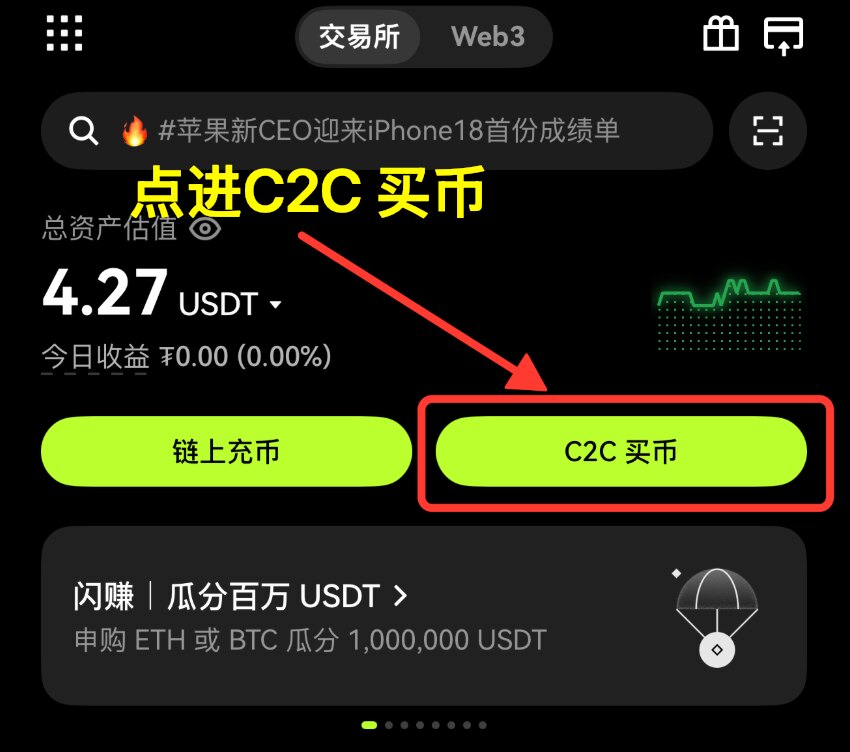
- Open the OKX app and tap "C2C 买币" (Buy with C2C) on the home screen.
- It opens in "Express" by default, which matches a seller for you. Choose "Buy", set "I pay" to CNY and "I receive" to USDT — that is, CNY for USDT. (You can also switch to "P2P" and pick a seller with many completed orders and a high rating.)
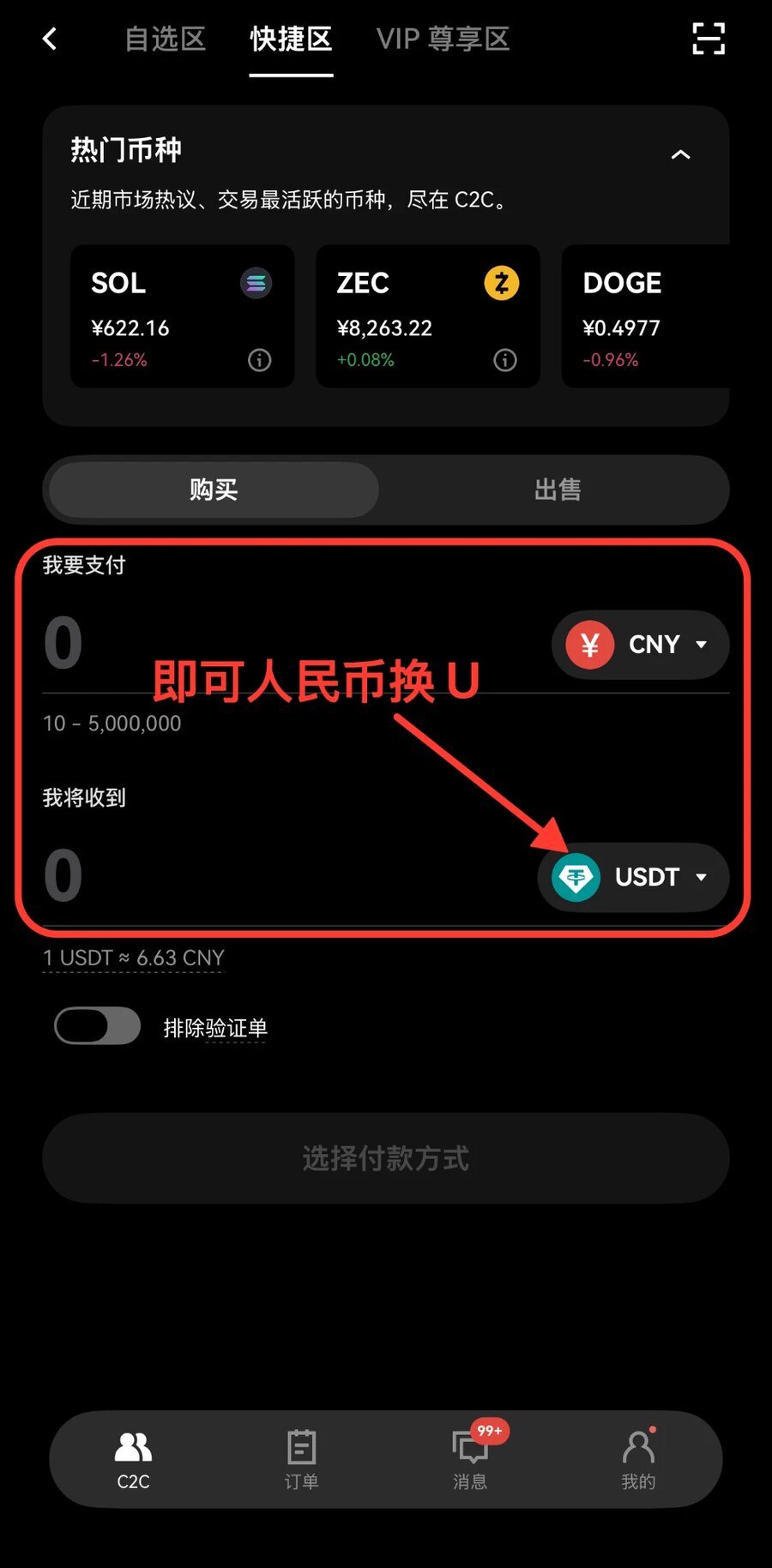
- Enter the amount — buy enough USDT: order amount + withdrawal fee + a little extra. For example, for an order of about 228 USDT, buy around 231 USDT.
- Tap "Select payment method" (Alipay / WeChat / bank card) and confirm. C2C does not charge you automatically — you transfer the money to the seller yourself: the order shows the seller's payment details. For Alipay, send from your Alipay to the account the seller gives; for WeChat, add the seller's WeChat and send a red packet (or transfer); for bank card, transfer to the seller's card. Pay the same amount as the C2C order, then go back to the app and tap "I have paid".
- After the seller confirms payment they release the coins, and the USDT goes to your "Funding account", ready to withdraw.


C2C sellers are verified by the platform; paying by Alipay transfer or adding the seller's WeChat to send a red packet are normal payment methods. Use the payment account and WeChat ID shown in the app order; do not tap "I have paid" until the money is sent; if something goes wrong, tap "Appeal" in the order.
3 · Withdraw from OKX to the order
First place the order in our shop, open the order page, choose the network, copy the amount and payment address, then do this in OKX:
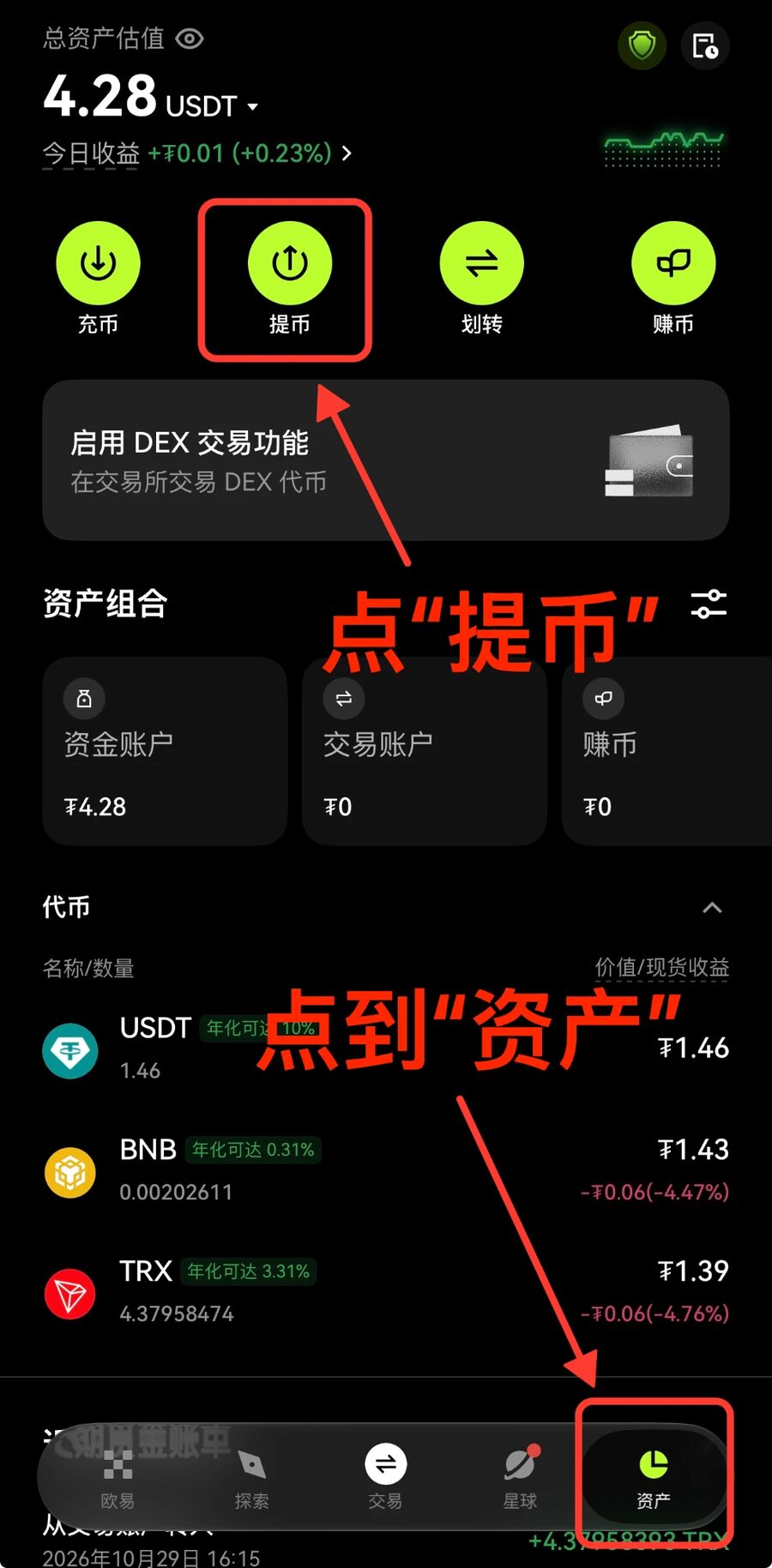
- In the OKX app, tap "Assets" at the bottom right, then "Withdraw".
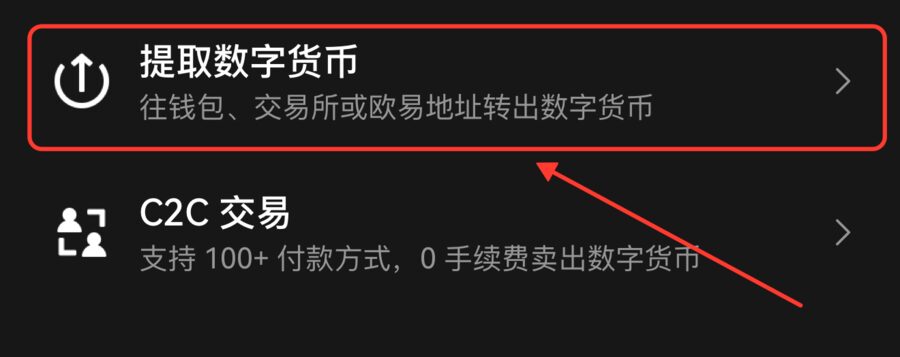
- Choose the on-chain crypto withdrawal option, not "C2C trade".
- Choose USDT as the coin.
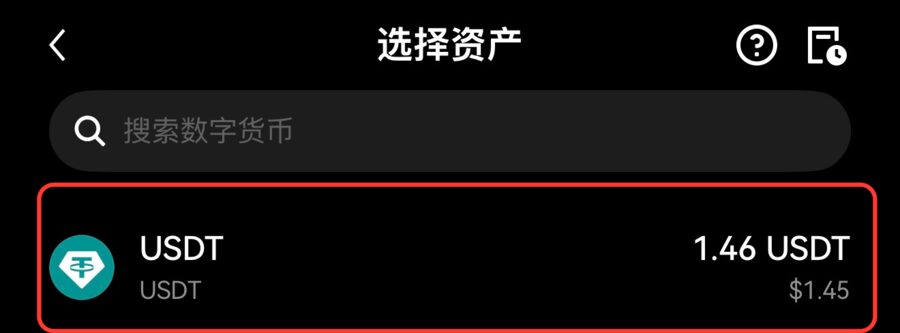
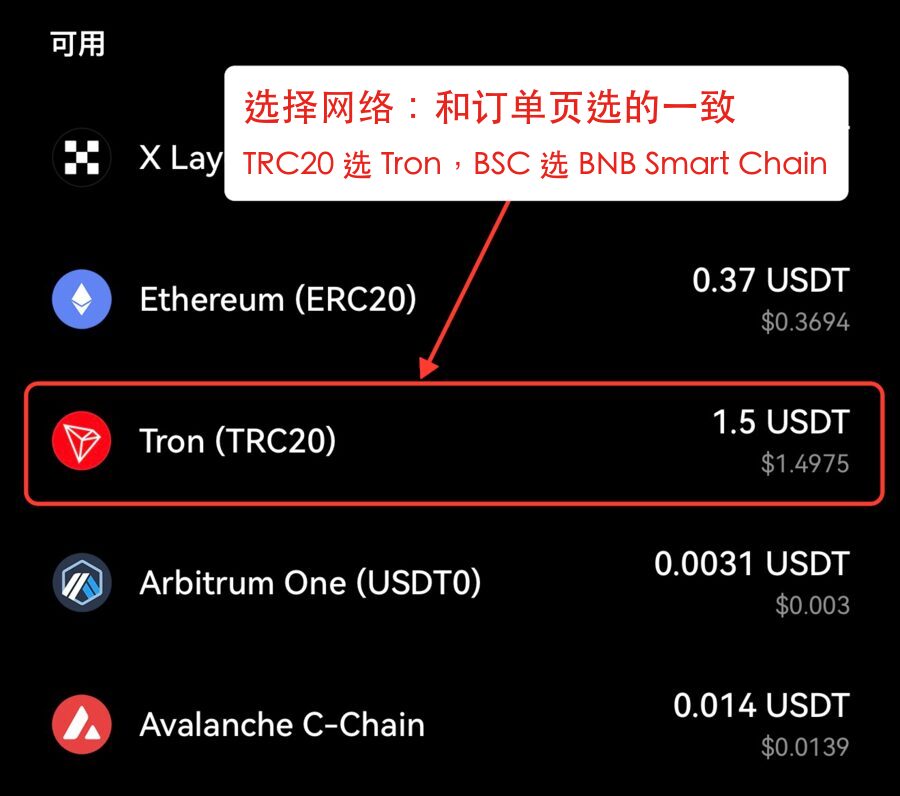
- Use the same network as the order page: if the order page says TRC20 choose "Tron (TRC20)"; if it says BEP20 choose "BNB Smart Chain".
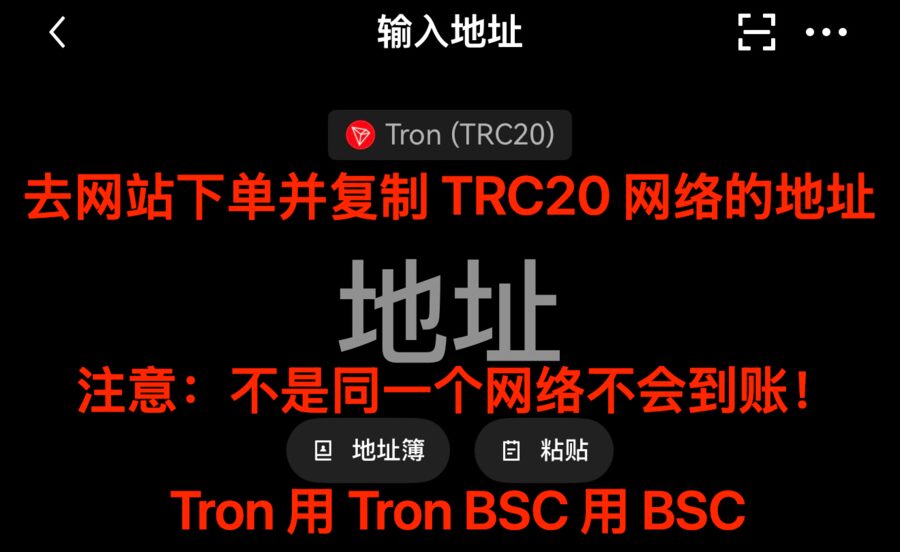
- Paste the payment address for that same network from the order page. A different network will not arrive.
- If it asks for a withdrawal type, choose "On-chain withdrawal", not "Internal transfer".
- Amount: watch the "amount received" on the page and adjust it to equal the order amount exactly (3 decimal places) before submitting. The fee is whatever the page shows.
- Submit and complete the verification. It usually arrives within minutes, and the order page switches to paid automatically.


4 · Buy USDT on Binance
- Open the Binance app and tap "Buy crypto" → "C2C" on the home screen (called "P2P" in some versions).
- Choose "Buy" and USDT. "Express" matches a seller for you, or pick one in "P2P" with many completed orders and a high rating.
- Enter the amount: order amount + withdrawal fee + a little extra, choose a payment method, and tap "Buy USDT" to confirm.
- Pay the seller yourself before the countdown ends: the order shows the seller's payment details — for Alipay, transfer to the account they give; for WeChat, add their WeChat and send a red packet (or transfer); for bank card, transfer to their card. Then go back to the app and tap "I have paid".
- Once the seller releases the coins, the USDT goes to your "Funding account".
As with OKX, paying by Alipay transfer or adding the seller's WeChat to send a red packet is the normal C2C process. Use the payment account and WeChat ID shown in the app order; if something goes wrong, tap "Appeal" in the order.
5 · Withdraw from Binance to the order
First place the order in our shop, open the order page, choose the network, copy the amount and payment address, then do this in Binance:
- In the Binance app, tap "Assets" at the bottom right, then "Send" under "Overview".
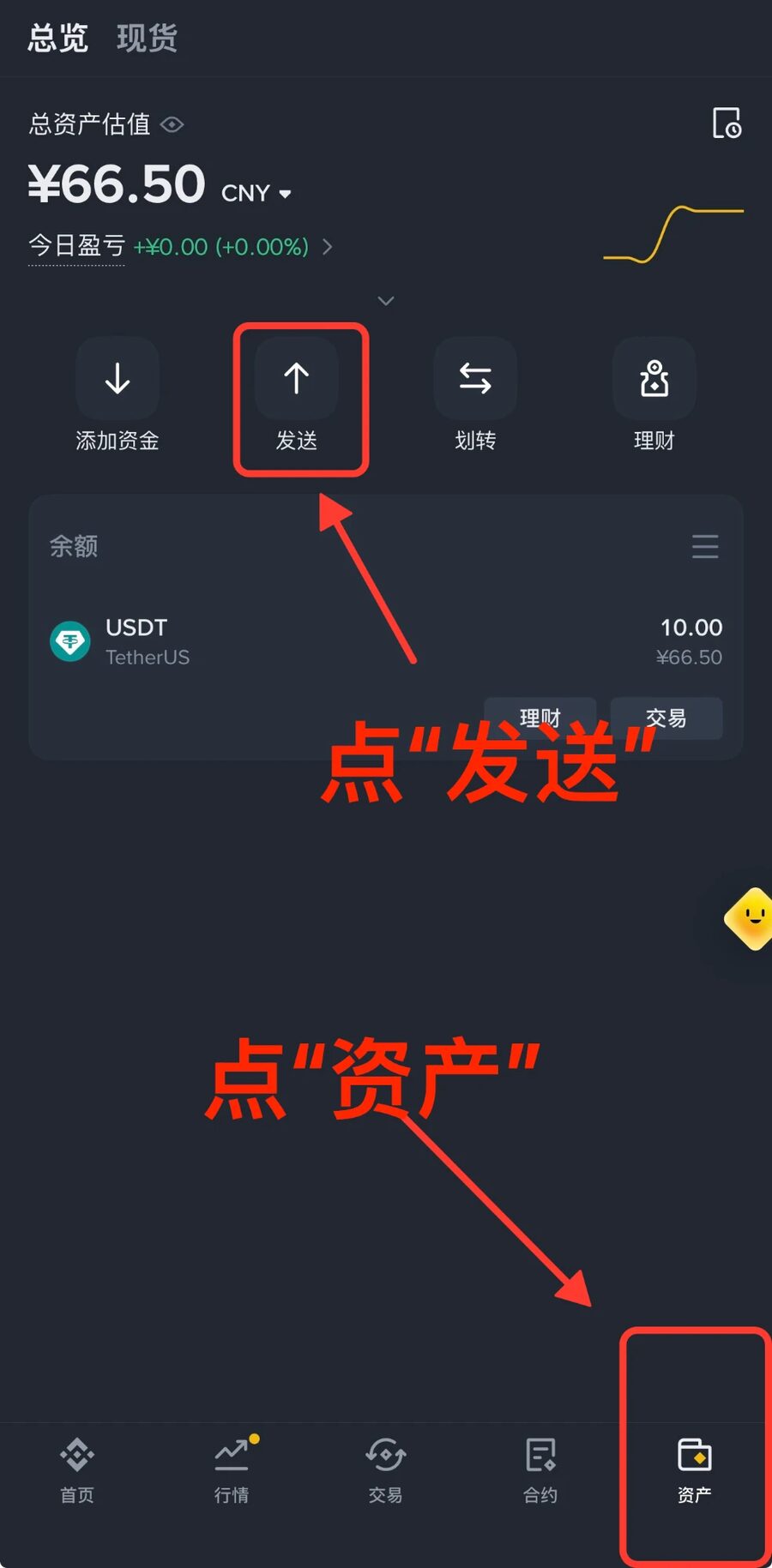
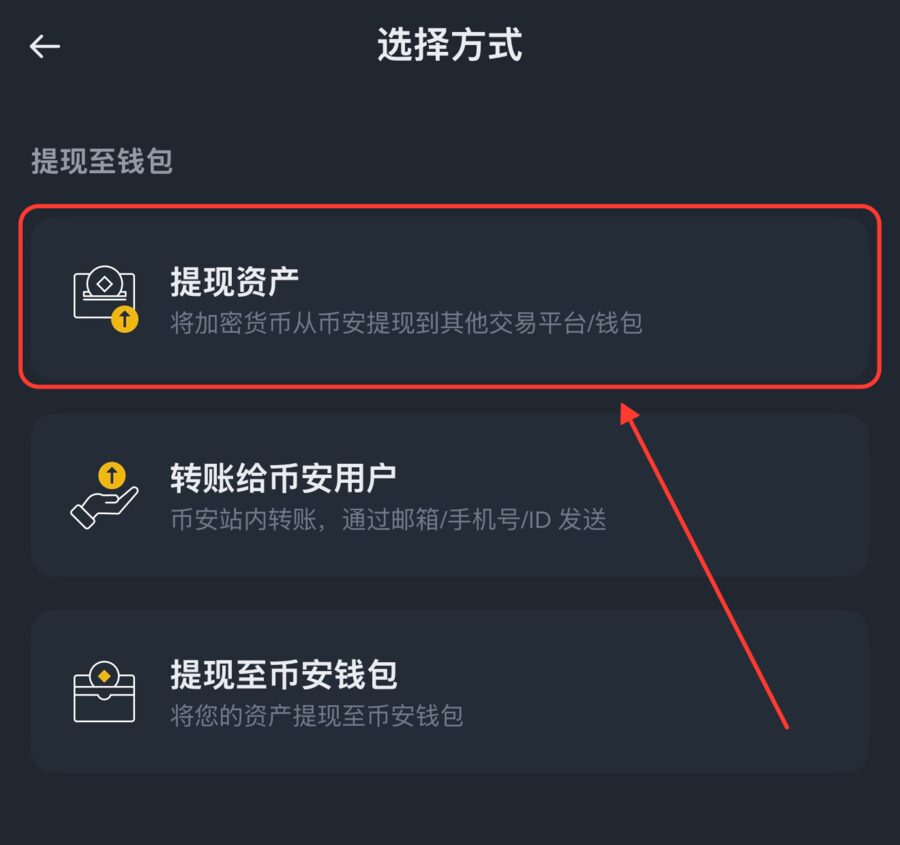
- Choose "Withdraw" (提现资产), not "Send to Binance user". Send from your "Funding account" and choose USDT.
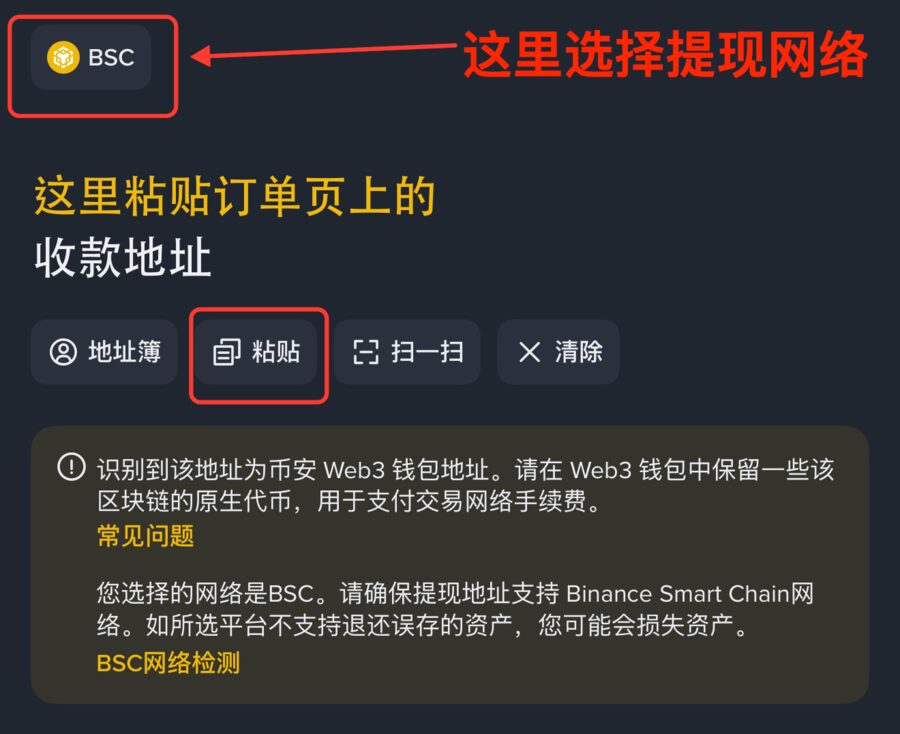
- Choose the withdrawal network at the top left, then tap "Paste" to fill in the payment address from the order page. Use the same network as the order page: for TRC20 choose "TRON (TRC20)", for BEP20 choose "BNB Smart Chain (BEP20)", sometimes called BSC.
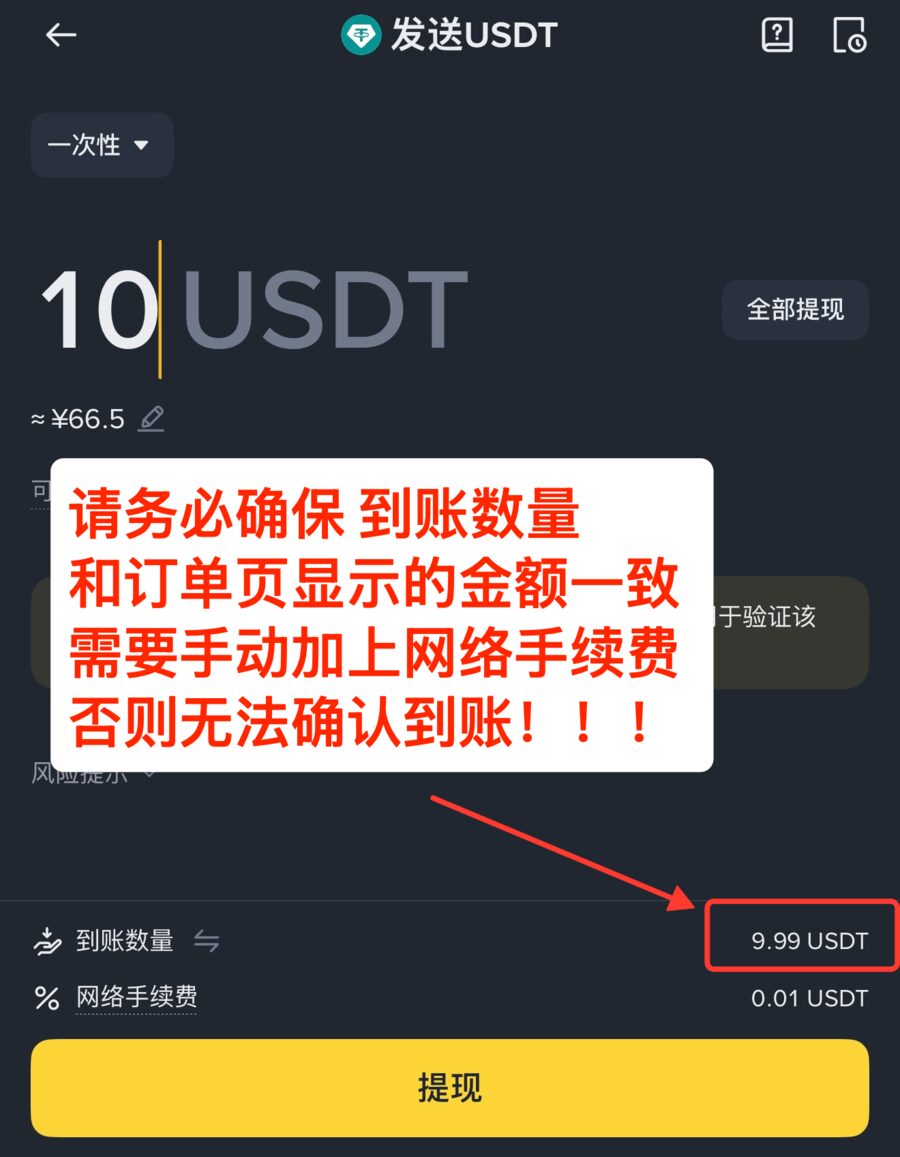
- Set the amount type to "Receive amount" and enter the order amount directly (3 decimal places); the fee is added on top. If you enter the total withdrawal amount instead, the fee is taken out of it (in the picture 10 entered, only 9.99 arrives) and you have to add the fee yourself. Before submitting, check the "amount received" at the bottom — it must equal the order amount exactly.
- Tap "Withdraw", check the address and network, slide to confirm, and finish with your passkey or two-factor verification.
- The first time you withdraw to an address, Binance suggests sending a small test first. Do not do that for our orders — an order only accepts one transfer of the exact amount.


6 · USDT already in a wallet (Trust Wallet, imToken, TokenPocket, etc.)
- Open your wallet, choose USDT on the chain it is on (TRON or BNB Smart Chain), and tap "Send" or "Transfer". Choose the same network on the order page.
- Paste the order page's payment address for the same network, and enter the order amount directly (3 decimal places).
- Keep a little TRX (TRON) or BNB (BNB Smart Chain) in the wallet for the network fee; it is charged separately and does not change the amount received. Then confirm the send.
7 · FAQ
- How much USDT should I buy?
- The product page shows "≈ X USDT" next to the price, and the order page shows the exact amount after you order. Buy 1–2 USDT extra for the withdrawal fee.
- How long until it arrives?
- Usually a few minutes. Once it arrives, the order page switches to paid within 1 minute — no button to press; if it has not changed after 10 minutes, send your order number and transaction hash (TxID) to support.
- A little less arrived (the fee was deducted). What now?
- Do not send another transfer yourself. Contact support with your order number and the transaction hash (TxID) from your withdrawal record.
- Wrong network, or sent a different coin?
- Wrong on-chain transfers are basically unrecoverable — always check the network and coin before submitting.
- It arrived after the order timed out and closed?
- Within 2 hours after an order closes, a transfer of the exact amount is still confirmed automatically — wait a moment and refresh the order page. After 2 hours, or if the amount is wrong, contact support with your order number and transaction hash.
- Do I really transfer money and add WeChat myself to buy USDT with C2C?
- Yes. With C2C you pay a platform-verified seller directly; the app does not charge you automatically. For Alipay, transfer to the Alipay account the seller gives in the order; for WeChat, add the seller's WeChat and send a red packet or transfer. Pick sellers with many completed orders and a high rating; pay from an account in your own real name, the same amount as the C2C order; then tap "I have paid", and after the seller releases the coins the USDT arrives in your funding account. If something goes wrong, tap "Appeal" in the order.
- My exchange withdrawal is stuck in review?
- That is the exchange's risk control — you can only wait for the exchange. If it takes too long the order will time out; contact support.
Button names may differ slightly after app updates — go by what the app actually shows.